Newsletter Subscribe
Enter your email address below and subscribe to our newsletter

 ByJohn A
Sending the same resume to every employer may feel faster, but it often leads to weaker results. Each job opening has different requirements, responsibilities, keywords, and expectations. A resume that works well for one role may not be strong enough for another, even if the job titles look similar. That is why customizing your resume for every job application is one of the smartest ways to improve your chances of getting noticed.
Recruiters are not only looking for qualified candidates. They are looking for candidates whose experience clearly matches the role they are hiring for. When your resume speaks directly to the job description, it becomes easier for hiring managers to see why you are a good fit.
Using a professional Resume Builder like MyCVCreator can make this process much easier. Instead of rebuilding your resume from the beginning each time, you can create a strong base resume, adjust key sections, and quickly tailor your application for different opportunities.
Many job seekers believe that once they have a polished resume, they can use it for every application. While having a strong general resume is important, employers usually respond better to resumes that are targeted.
A customized resume helps you:
Show direct alignment with the job description.
Highlight the most relevant skills and achievements.
Use keywords that applicant tracking systems may scan for.
Remove unrelated information that weakens your application.
Make the recruiter’s job easier by showing your fit quickly.
A resume should not simply explain everything you have ever done. It should present the most relevant version of your professional story for the role you want.
See also: Smart Family Wellness: Simple Health Habits Every Parent Should Follow
Before customizing your resume, create a master resume. This is a complete document that includes all your work experience, skills, achievements, certifications, education, tools, projects, and volunteer experience.
Your master resume is not the version you send to employers. It is your personal reference document.
Include:
Every job you have held.
All major responsibilities.
Measurable achievements.
Technical skills.
Soft skills.
Tools and software.
Certifications.
Awards.
Projects.
Volunteer work.
Training programs.
Once you have a master resume, customizing becomes easier. You can copy the most relevant details into a shorter, targeted resume for each application.
The job description is your guide. It tells you what the employer wants, what problems they need solved, and what skills they value most.
When reading a job posting, look for:
Required skills.
Preferred qualifications.
Repeated keywords.
Software or tools mentioned.
Main responsibilities.
Industry-specific language.
Experience level.
Soft skills.
Performance expectations.
For example, if a job posting repeatedly mentions “customer service,” “CRM software,” “problem resolution,” and “email support,” your resume should reflect those terms if they match your real experience.
Do not copy the job description word-for-word. Instead, use similar language naturally and honestly.
Your resume summary is one of the first sections recruiters read. It should quickly explain who you are, what you do, and why you are relevant to the position.
A generic summary may look like this:
“Hardworking professional with experience in customer service, administration, and communication.”
A customized summary is stronger:
“Customer service professional with 4+ years of experience handling client inquiries, resolving complaints, and using CRM tools to improve response times and customer satisfaction.”
The second version is more specific. It shows experience, skills, tools, and value.
When customizing your summary, include:
Your target job title or profession.
Years of experience, if relevant.
Two or three important skills from the job description.
One clear result or strength.
The goal is to make the recruiter think, “This person fits what we need.”
The skills section is one of the easiest places to customize your resume. Many employers and applicant tracking systems scan this section for job-related keywords.
Start by comparing your current skills list with the job description. Then prioritize the skills that match the role.
For example, if you are applying for a digital marketing role, your skills section may include:
SEO.
Content marketing.
Google Analytics.
Email marketing.
Social media management.
Keyword research.
Copywriting.
Campaign reporting.
If you are applying for an administrative assistant role, your skills section may include:
Calendar management.
Data entry.
Email communication.
Microsoft Office.
Document preparation.
Meeting coordination.
File organization.
Customer support.
The skills should change depending on the job. Avoid listing every skill you have. Focus on the ones that matter most for that specific application.
You do not always need to rewrite your entire work history. Sometimes, you only need to reorder or reframe your bullet points.
The most relevant achievements should appear first under each job. Recruiters often skim resumes quickly, so your strongest and most job-related points should be easy to find.
For example, if you are applying for a sales role, move sales-related achievements higher:
“Increased monthly sales by 18% through consistent follow-up with warm leads.”
“Maintained strong client relationships and improved repeat purchases.”
“Prepared weekly sales reports for management review.”
If you are applying for a customer service role, highlight customer-facing experience first:
“Resolved 60+ customer inquiries per day through phone, email, and live chat.”
“Reduced complaint escalation by improving response templates.”
“Maintained professional communication with clients during high-volume periods.”
Same experience, different focus.
Many companies use applicant tracking systems to organize and filter resumes. These systems may scan for keywords related to the job.
Keywords can include:
Job titles.
Technical skills.
Certifications.
Software names.
Industry terms.
Required qualifications.
Core responsibilities.
Soft skills.
For example, a project coordinator job may include keywords like:
Project planning.
Scheduling.
Stakeholder communication.
Budget tracking.
Risk management.
Reporting.
Agile.
Microsoft Project.
If you have these skills, include them naturally in your resume. A professional Resume Builder can help you organize these keywords into the right sections without making your resume look crowded.
Avoid keyword stuffing. Your resume should still sound natural and professional.
Achievements are more powerful than responsibilities. Instead of only saying what you were responsible for, show what you improved, completed, increased, reduced, organized, or delivered.
Generic responsibility:
“Responsible for managing social media accounts.”
Customized achievement:
“Managed social media content calendar and increased monthly engagement by creating targeted posts for customer education.”
Generic responsibility:
“Handled customer complaints.”
Customized achievement:
“Resolved customer complaints through email and phone support, improving customer satisfaction and reducing repeat issues.”
Generic responsibility:
“Worked on reports.”
Customized achievement:
“Prepared weekly performance reports using Excel to help managers track sales trends and team productivity.”
Whenever possible, include numbers. Numbers make your resume more credible.
Examples:
Increased sales by 20%.
Reduced processing time by 30%.
Managed a team of 8.
Handled 50+ calls daily.
Completed projects 2 weeks early.
Supported 100+ customers weekly.
Even if you do not have exact numbers, you can still describe the impact clearly.
Your resume title or headline should match the role you are targeting. This is especially useful if you have experience in more than one area.
For example:
“Administrative Assistant”
“Customer Service Representative”
“Digital Marketing Specialist”
“Entry-Level Data Analyst”
“Project Coordinator”
“Sales Executive”
If the job posting says “Customer Support Specialist,” and your experience matches that role, you can use a similar title. This helps recruiters quickly understand your target position.
Customization is not only about adding information. It is also about removing details that do not support your application.
A resume that includes too much unrelated information can distract from your strongest qualifications.
Remove or reduce:
Old jobs that are not relevant.
Unrelated hobbies.
Outdated skills.
Repeated responsibilities.
Long descriptions of minor roles.
Unnecessary personal details.
Your resume should usually be one to two pages, depending on your experience level. The more focused it is, the easier it is for employers to understand your value.
If you are changing careers, resume customization becomes even more important. You need to show how your previous experience connects to the new role.
Focus on transferable skills such as:
Communication.
Leadership.
Customer service.
Problem-solving.
Project management.
Data analysis.
Research.
Sales.
Writing.
Organization.
For example, if you are moving from teaching to corporate training, highlight:
Lesson planning.
Presentation skills.
Training delivery.
Curriculum development.
Learner assessment.
Communication.
Performance improvement.
You can also use a strong summary to explain your direction:
“Former educator transitioning into corporate training, with strong experience in instructional planning, presentation delivery, learner engagement, and performance assessment.”
This helps employers understand the connection.
If you are applying for your first job, you may not have much work experience. That does not mean your resume should be empty.
Customize your resume by highlighting:
Education.
Internships.
School projects.
Volunteer work.
Leadership roles.
Part-time jobs.
Certifications.
Technical skills.
Coursework.
Personal projects.
For example:
“Completed a marketing project that involved competitor research, social media planning, and campaign presentation.”
“Volunteered as an event assistant, helping with registration, guest communication, and schedule coordination.”
“Created a personal portfolio website using HTML and CSS.”
Entry-level resumes should focus on potential, relevant skills, and willingness to learn.
Remote jobs often require more than technical ability. Employers want to know that you can work independently, communicate clearly, and manage your time.
For remote applications, highlight skills such as:
Remote collaboration.
Time management.
Self-motivation.
Written communication.
Virtual meeting tools.
Project management software.
Cloud-based tools.
Independent problem-solving.
Example bullet points:
“Collaborated with remote team members using Slack, Zoom, and Google Workspace to complete weekly project tasks.”
“Managed daily workload independently while meeting deadlines in a remote work environment.”
This shows that you understand how remote work operates.
The same skill can be presented differently depending on the industry.
For example, communication skills in healthcare may focus on patient interaction. In marketing, communication may focus on content and brand messaging. In administration, it may focus on emails, reports, and office coordination.
For a healthcare role:
“Communicated clearly with patients and staff to support smooth appointment scheduling and follow-up.”
For a marketing role:
“Created clear brand messaging for email campaigns, social media posts, and website content.”
For an administrative role:
“Managed professional email communication, meeting notes, and internal office updates.”
The more your resume reflects the industry language, the stronger it becomes.
Customizing every resume manually can be time-consuming. This is where a Resume Builder becomes useful.
MyCVCreator helps job seekers create professional resumes with clean formatting, organized sections, and easy editing options. Instead of struggling with layout every time, you can focus on tailoring your content.
A resume builder can help you:
Create a professional resume faster.
Use clean and modern formatting.
Edit your summary and skills quickly.
Save different resume versions.
Avoid formatting mistakes.
Organize your work experience clearly.
Build resumes suitable for different job applications.
When you can edit your resume quickly, you are more likely to customize it properly instead of sending the same version everywhere.
Imagine you have experience as an administrative assistant and you are applying for two different jobs.
Focus your resume on:
Office organization.
Calendar management.
Document preparation.
Vendor communication.
Data entry.
Meeting coordination.
Example bullet:
“Managed office schedules, prepared internal documents, and coordinated meetings to support daily business operations.”
Focus your resume on:
Customer communication.
Complaint resolution.
CRM tools.
Email support.
Follow-up.
Service quality.
Example bullet:
“Responded to customer inquiries through email and phone support, resolving issues quickly and maintaining accurate records in CRM software.”
Both roles may use the same background, but the resume should highlight different strengths.
Do not only change the job title and leave everything else the same. True customization means adjusting the summary, skills, and experience to match the role.
Using the employer’s exact wording too much can make your resume look lazy or dishonest. Use relevant keywords, but write in your own professional voice.
Never add a skill just because it appears in the job posting. If you are asked about it in an interview, you should be able to explain your experience.
Customization should make your resume sharper, not longer. Remove details that do not support the application.
Your resume and cover letter should work together. If you customize your resume, also adjust your cover letter so both documents support the same message.
Before applying, ask yourself:
Does my resume match the job title?
Did I include the most important skills from the job description?
Is my summary tailored to the role?
Are my strongest achievements near the top?
Did I use keywords naturally?
Did I remove unrelated information?
Is the formatting clean and professional?
Did I proofread carefully?
Does my resume show why I am a strong fit?
A few extra minutes of review can make a big difference.
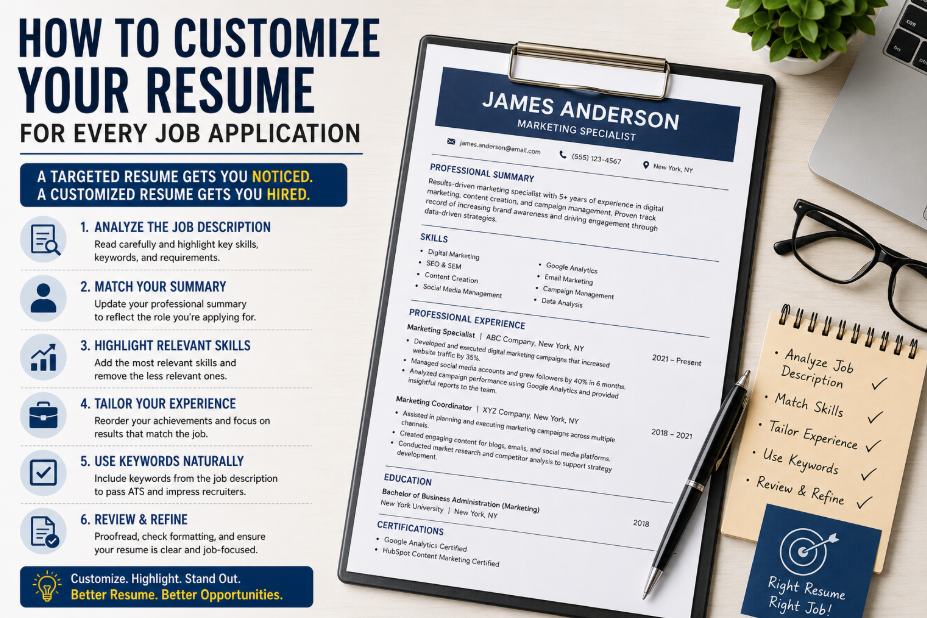
Customizing your resume for every job application is one of the best ways to improve your job search results. It helps you show employers that you understand the role, have the right skills, and can bring value to their organization.
You do not need to rewrite your entire resume each time. Start with a strong master resume, study the job description, adjust your summary, update your skills, reorder your achievements, and include relevant keywords naturally.
With the help of a professional Resume Builder like MyCVCreator, job seekers can create, edit, and customize resumes more easily. A targeted resume shows employers that you are not just looking for any job — you are prepared for their specific opportunity.